ACTUAL APP SCREENS · FICTIONAL EXAMPLES
From a parenting journal entry to a PDF timeline
See the workflow before creating an account.
This 24-second captioned slideshow uses actual app screens and an app-generated sample report. It illustrates the steps; it is not a recording of a live user session. There is no audio.
Open 24-second video Download MP4 · Download WebM
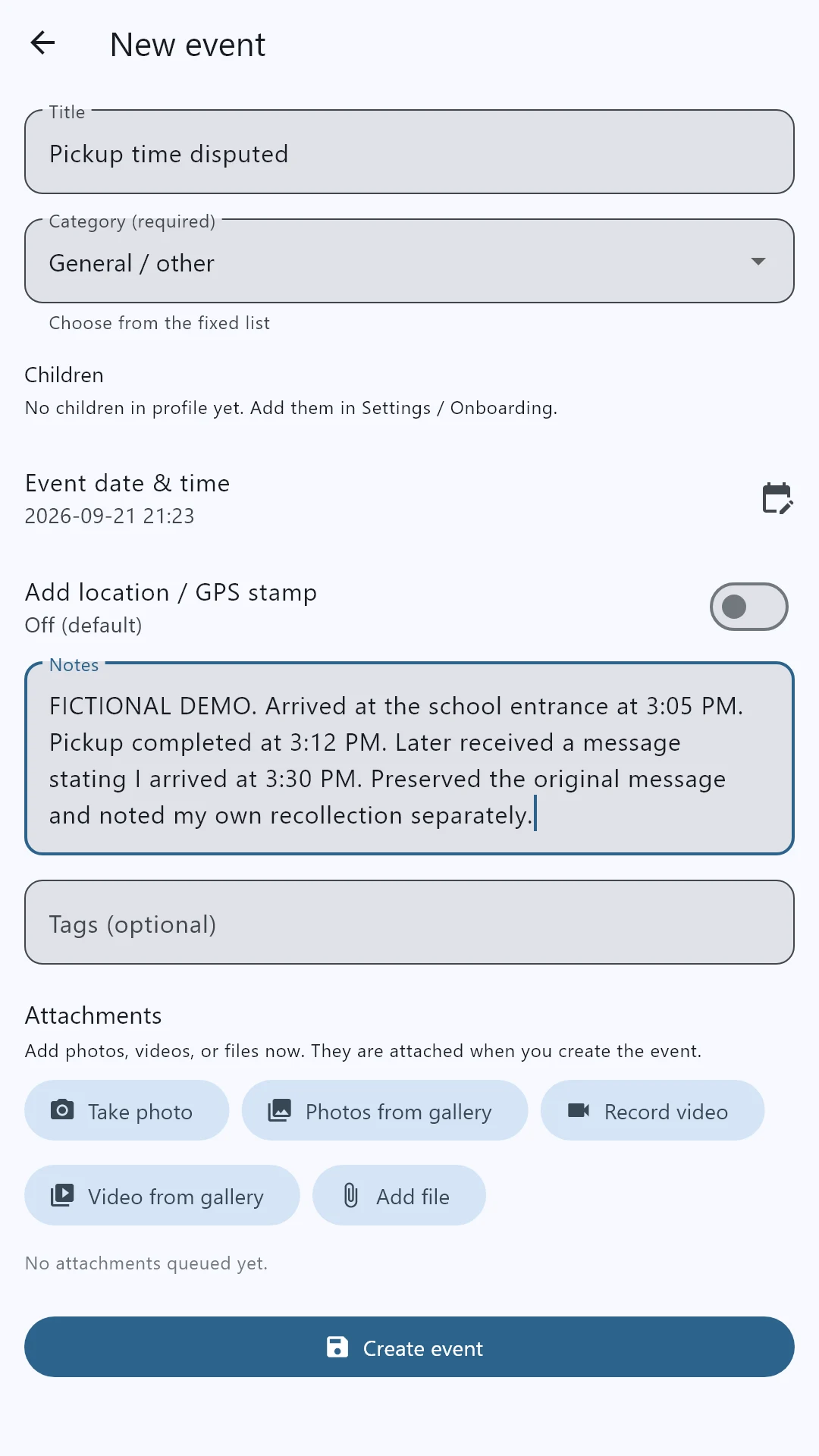
1. Write a dated entry
Add a title, event date, category and a factual note. Record what you observed and keep interpretation separate. The sample screens use fictional parenting events.
2. Review your timeline
Find related entries together rather than searching through unrelated conversations. Keep your original messages, photos and documents with the relevant records.
3. Choose the export options
Select the PDF report option and a date range, then review what will be included. When you choose to include available GPS information, location details add context about when and where the phone captured that location.
4. Preview the finished PDF
Read the report before saving or sharing. Open the complete fictional sample PDF to see notes, supporting context and an illustrative location map. Share your own report privately with an appropriate professional; court requirements vary.
Request Android beta access Android installation guide
Evidence Locker organizes your account of events. It does not independently authenticate an entry or guarantee a legal outcome.
Published by Evidence Locker · Updated September 23, 2026 · Record-organization guidance, not legal advice.